[JavaScript] A Closer Look at Function Coding Challenge #1
![[JavaScript] A Closer Look at Function Coding Challenge #1](https://cdn.hashnode.com/res/hashnode/image/unsplash/L8KQIPCODV8/upload/v1655429707047/R7DvxF9Xt.jpeg)
Let's build a simple poll app!
A poll has a question, an array of options from which people can choose, and an
array with the number of replies for each option. This data is stored in the starter 'poll' object below.
Your tasks:
Create a method called
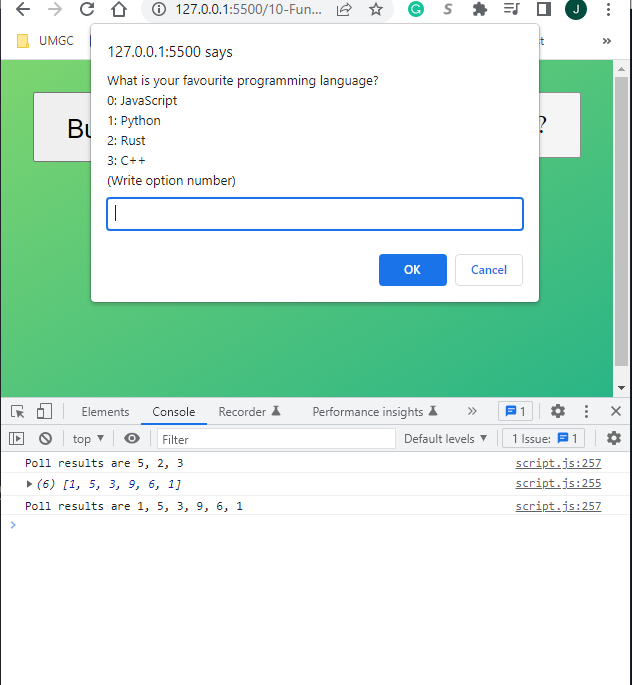
'registerNewAnswer'on the'poll'object. The method does 2 things:- Display a prompt window for the user to input the number of the selected option. The prompt should look like this: What is your favorite programming language? 0: JavaScript 1: Python 2: Rust 3: C++ (Write option number)
- Based on the input number, update the
'answers'array property. For example, if the option is 3, increase the value at position 3 of the array by
- Based on the input number, update the
Make sure to check if the input is a number and if the number makes sense (e.g. answer 52 wouldn't make sense, right?)
Call this method whenever the user clicks the
"Answer poll"button.Create a method
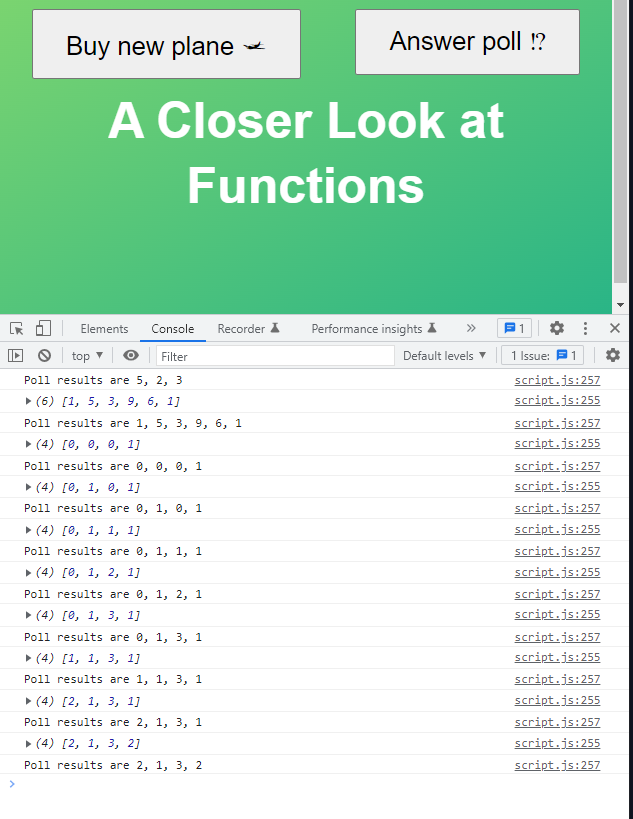
'displayResults'which displays the poll results. The method takes a string as an input (called'type'), which can be either 'string' or 'array'. If type is'array', simply display the results array as it is, usingconsole.log(). This should be the default option. If type is'string', display a string like "Poll results are 13, 2, 4, 1".Run the
'displayResults'method at the end of each'registerNewAnswer'method call.Bonus: Use the
'displayResults'method to display the 2 arrays in the test data. Use both the'array'and the'string'option. Do not put the arrays in the poll object! So what should this keyword look like in this situation?
Test data for bonus: § Data 1: [5, 2, 3] § Data 2: [1, 5, 3, 9, 6, 1]
- Codes
const poll = {
  question: 'What is your favourite programming language?',
  options: ['0: JavaScript', '1: Python', '2: Rust', '3: C++'],
  // This generates [0, 0, 0, 0]. More in the next section!
  answers: new Array(4).fill(0),

  registerNewAnswer() {
    const answer = Number(
      prompt(
        `${this.question}\n${this.options.join('\n')}\n(Write option number)`
      )
    );

    // Register answer
    typeof answer === 'number' &&
      this.answer < this.answers.length &&
      this.answers[answer]++;
    // if (typeof answer === 'number' && answer < this.answers.length) {
    //   this.answers[answer]++;
    // } else {
    //   alert('Not the options!');
    // }

    this.displayResults();
    this.displayResults('string');
  },

  displayResults(type = 'array') {
    if (type === 'array') {
      console.log(this.answers);
    } else if (type === 'string') {
      console.log(`Poll results are ${this.answers.join(', ')}`);
      // `Poll results are ${this.answers[0]}, ${this.answers[1]}, ${this.answers[2]}, ${this.answers[3]}`
    }
  },
};

document
  .querySelector('.poll')
  .addEventListener('click', poll.registerNewAnswer.bind(poll));

// Bonus
poll.displayResults.call({ answers: [5, 2, 3] }, 'string');
poll.displayResults.call({ answers: [1, 5, 3, 9, 6, 1] });
poll.displayResults.call({ answers: [1, 5, 3, 9, 6, 1] }, 'string');
- Results