[JavaScript] Data Structures and Modern Operators: Coding Challenge #4
![[JavaScript] Data Structures and Modern Operators: Coding Challenge #4](https://cdn.hashnode.com/res/hashnode/image/unsplash/g5jpH62pwes/upload/v1655273956202/Hp4lHWdyU.jpeg)
Write a program that receives a list of variable names written in underscore_case
and convert them to camelCase.
The input will come from a textarea inserted into the DOM (see code below to
insert the elements), and conversion will happen when the button is pressed.
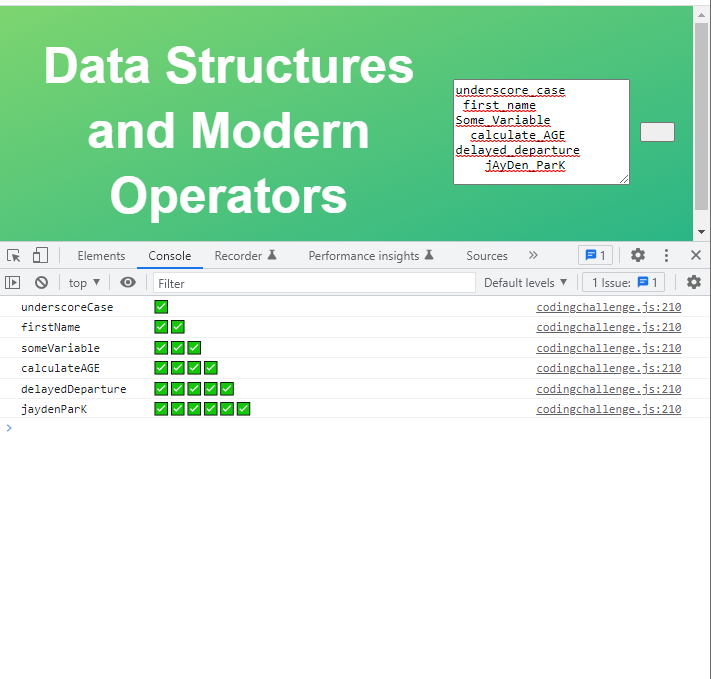
Test data (pasted to textarea, including spaces):
underscore_case
  first_name
Some_Variable
    calculate_AGE
delayed_departure
Should produce this output (5 separate console.log outputs):
underscoreCase     ✅
firstName          ✅✅
someVariable       ✅✅✅
calculateAge       ✅✅✅✅
delayedDeparture   ✅✅✅✅✅
Hints:
§ Remember which character defines a new line in the textarea 😉
§ The solution only needs to work for a variable made out of 2 words, like a_b
§ Start without worrying about the ✅. Tackle that only after you have the variable name conversion working 😉
§ This challenge is difficult on purpose, so start watching the solution in case you're stuck. Then pause and continue!
Afterward, test with your own test data! GOOD LUCK 😀
Given codes for inserting elements:
document.body.append(document.createElement('textarea'));
document.body.append(document.createElement('button'));

const text = document.querySelector('textarea').value;
- Codes
document.body.append(document.createElement('textarea'));
document.body.append(document.createElement('button'));

// Recommended answer
 document.querySelector('button').addEventListener('click', function () {
   const text = document.querySelector('textarea').value;
   const rows = text.split('\n');

   for (const [i, row] of rows.entries()) {
     const [first, second] = row.toLowerCase().trim().split('_');

     const output = `${first}${second.replace(
       second[0],
       second[0].toUpperCase()
     )}`;
     console.log(`${output.padEnd(20)}${'✅'.repeat(i + 1)}`);
   }
 });

// Tried answer
document.querySelector('button').addEventListener('click', function () {
  const text = document.querySelector('textarea').value;
  const rows = text.split('\n');

  for (const [i, row] of rows.entries()) {
    const [first, second] = row.split('_');
    const secondTextUpper = [];
    secondTextUpper.push(first.replace(first, first.toLowerCase()));
    secondTextUpper.push(second.replace(second[0], second[0].toUpperCase()));
    console.log(
      `${secondTextUpper.join('').trim().padEnd(20)}${'✅'.repeat(i + 1)}`
    );
  }
});
- Result